


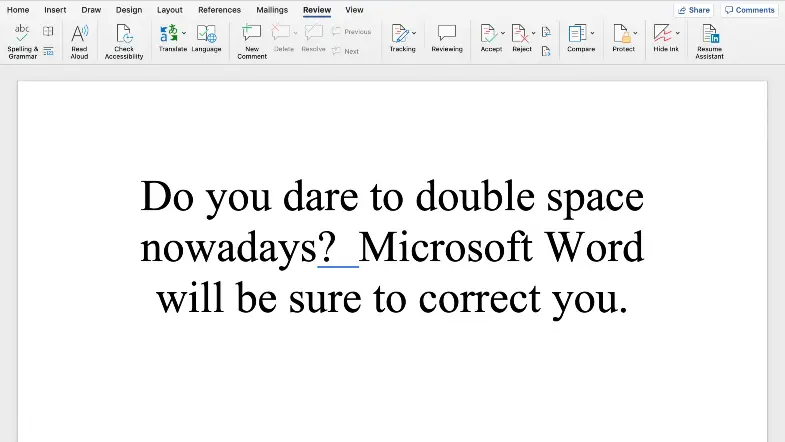
If you’re like me, you were taught how to type in a computer science class some time in elementary school or middle school. This is going back over a decade (I won’t give you my age, you can guess it). What if I told you that there was something in particular that was taught in these typing classes that isn’t quite right?
Are you ready to know?
According to Microsoft Word, a popular word processing software, double spacing after a new sentence is… an incorrect stylistic choice.
What?!
Their reasoning is this: double spaces after a new sentence originates from the days of the typewriter, a long ago era when words were typed in monospace. This meant that every letter had the same amount of spacing on each line. To make out the end of every sentence easier, people would insert a double space between them. It was purely a choice of legibility. Today’s fonts properly space out words and letters so that double spacing isn’t necessary, apparently.
This was first noticed by University Professor of Denver law professor Alan Chen.
The one-spacers have won. Microsoft Word now showing 2 spaces after a period as an error.
— Alan Chen (now on bsky.social too) (@profalankchen) April 10, 2020
How dare he!
The double-spacing error was also first reported on by tech at The Verge, who gives a report on why Microsoft is doing it.
To make matters worse (for those of us who use double spaces all the time!), many style guides, such as APA, Chicago Manual of Style, AP, and US Government Printing Office Style Manual, suggest a single space after each sentence. I’m not sure if my ignorance has allowed me to type double space almost all my life, or if no one ever bothered to correct this “mistake.” Then again, I’ve typed in MLA most of my life, and there hasn’t been a mention of single spacing in that guide. This is an investigation that I have to do in my own mind in my own time.
So now, Microsoft Word reasons that double-spacing is not correct anymore, and will actually start marking them with those annoying blue squiggly lines, which lets you know you’ve made a grammatical or style error. This is coming in a future software update for those that use Word.
If you’d like to disable the check for this new grammatical error, simply right click to view your options when the error comes up. You can ask Word to ignore this issue when it comes up again or you can view every grammatical issue the software will mark and remove spacing from the list of errors. You can do this by clicking the Spelling and Grammar button under the Review tab.
And if you haven’t noticed… this whole article was typed with double spaces. Old habits die hard, I suppose.
featured image via word on macbook
During this difficult time we could use your support more than ever! If we’ve brought some joy to you or brightened your day or even distracted you for a few minutes, please donate whatever you can – any little bit counts. If you tried before we had some technical difficulties, so please give what you can now. Thank you so much!!